

Getting started: a provider's first steps
What to do, in which order, after you open your account — and where everything is in the provider portal menu.
Last checked: 1 October 2026
এই গাইডটি বাংলায় পড়ুনContents
The order of things
- Open an account and choose your services while registering — Account, sign-in and password.
- Give your service details (where you work, what you handle, licence number) — Services you offer and your profile.
- Submit your business registration and licences for verification — without it you don't appear in the public directory. Verification.
- If you do freight, add your routes and prices — Freight rates.
- Answer leads and send price offers — Leads and offers.
- Finish the work on an order and get paid — Service orders and payment.
Opening an account: choose your services first
The provider.exportain.com/register page first asks which services you offer. Then come your name, email, company and password — as for sellers; the steps are in Account, sign-in and password.
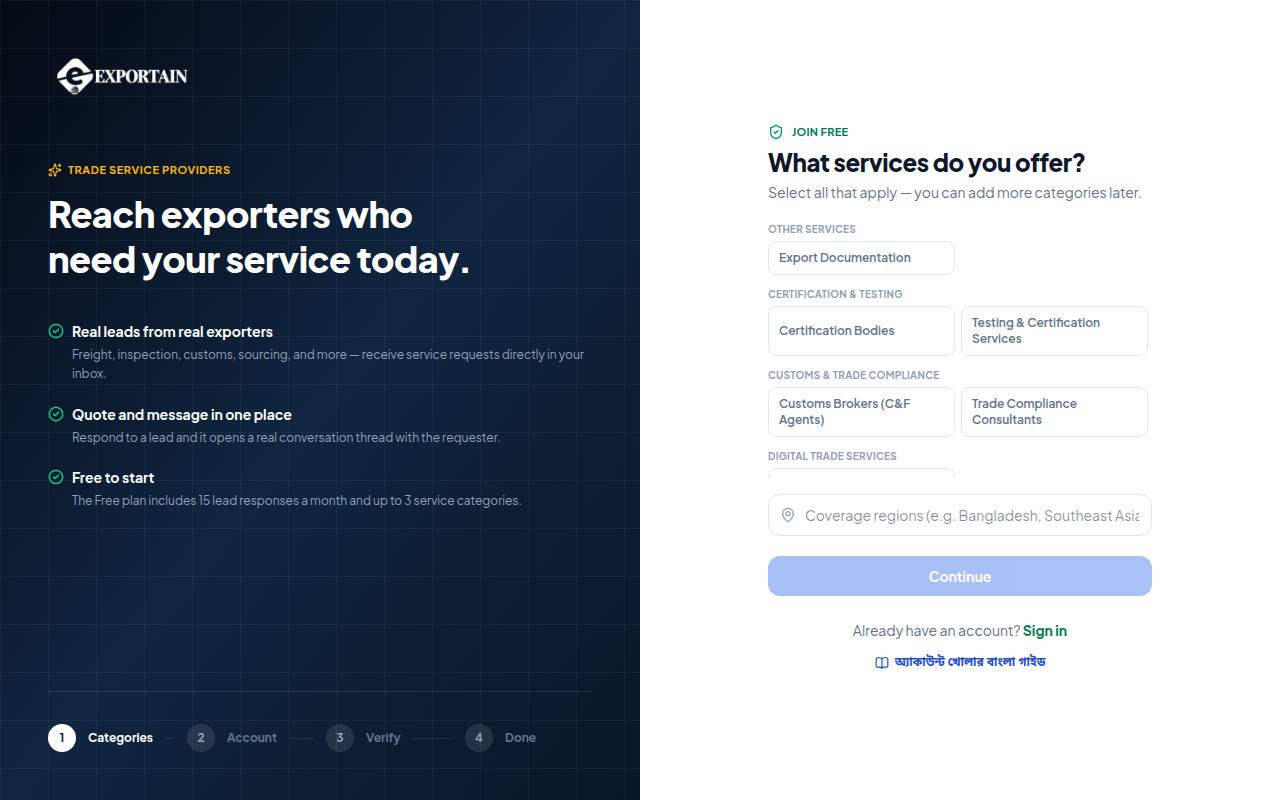
- 1. What services do you offer? — choose everything you do; you can add more later.
- 2. Each tile is one service (for example Customs Brokers (C&F Agents)). Click to select, click again to remove.
- 3. Coverage regions — where you work (for example Bangladesh, Southeast Asia).
- 4. Continue — switches on once at least one service is chosen; it takes you to the next step (name, email, password).
- 5. The step tracker: Categories → Account → Verify → Done.
Frequently asked questions (FAQ)
Why isn't my service showing publicly?
The public directory shows only companies whose business documents have been verified. Submit your business registration on the Verification page. The listing is also hidden when the free period ends — see Plans.