

Service orders and payment
The order after a customer accepts an offer, how Exportain holds the money, marking the work done, commission and payout.
Last checked: 1 October 2026
এই গাইডটি বাংলায় পড়ুনContents
The order's stages
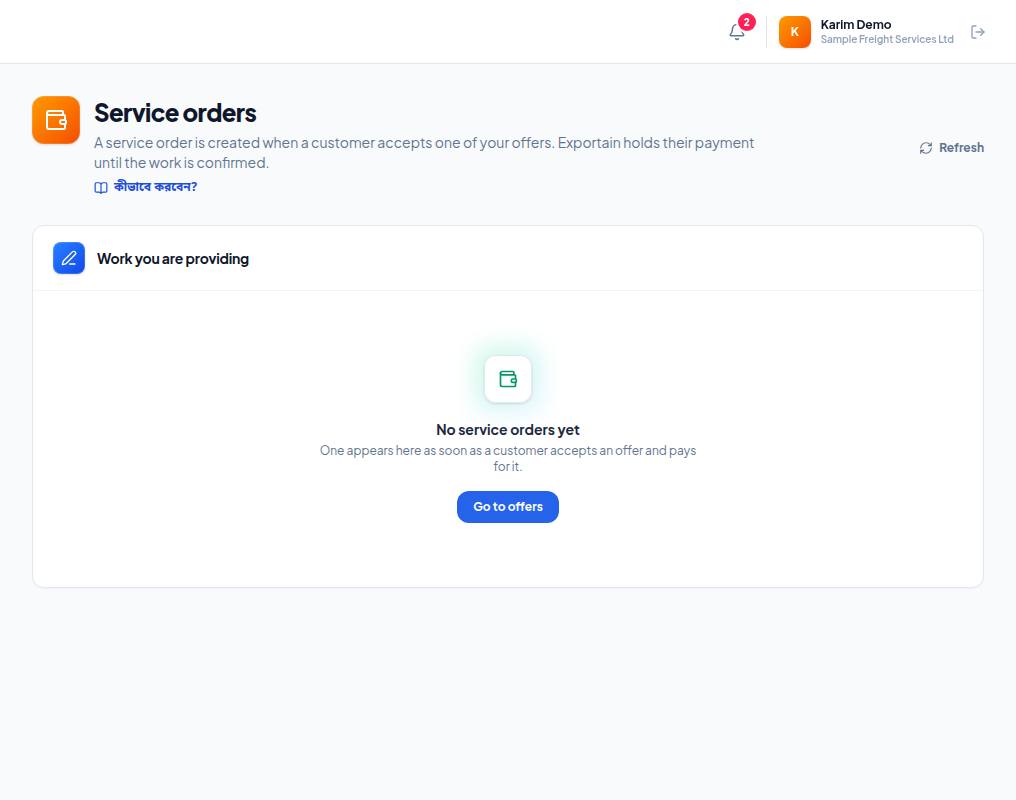
- 1. Work you are providing — an order appears here once a customer accepts one of your offers and pays for it, with its status and commission.
- 2. No service orders yet — there are no orders yet.
- 3. Go to offers — sending offers is how orders come.
| What the portal says | Meaning |
|---|---|
| Waiting for the customer to pay | The customer hasn't paid; Exportain holds nothing |
| The customer has paid and Exportain is holding the money | The money is with Exportain — start the work |
| You have said the work is done | You marked the work done; waiting for the customer's confirmation |
| The customer approved payment | The customer agreed; the money stays held until Exportain sends it |
| An Exportain administrator is reviewing it | The customer didn't answer in time; an admin is looking at it |
| The customer disagreed | Dispute — the money is frozen until an admin decides on the evidence |
| Exportain has recorded the payout to you | The money has been sent to you |
Marking the work done
- Open Service orders.
- When the work is finished, press Mark work complete on the order, then confirm.
- The customer is asked to confirm. If they don't answer within the set time (3 days), an admin reviews the order and contacts the customer.
Commission and payout
- Each order shows the Exportain commission. The rate depends on your plan: Free 5%, Gold 2%, Platinum 0%.
- The rate at the moment the offer is accepted is fixed for that order; changing your plan later doesn't change it on running orders.
- When the customer pays online, Exportain holds the money; on release, Exportain staff bank-transfer it to you and record it on the order.
- On orders paid directly (offline), Exportain holds no money — you collect it from the customer yourself.
If there is a dispute
If the customer objects to the work, the money stays frozen. Give your answer and evidence on the Disputes page — Disputes and evidence. You cannot open a dispute yourself from the provider portal.
Frequently asked questions (FAQ)
The customer isn't confirming — when do I get paid?
After 3 days the order goes to an admin, who looks at it and decides. Money is never released on its own.