

Verification, licences and certifications
What Exportain checks before listing you, submitting your business registration and licences, how each badge is earned and which are not live yet.
Last checked: 1 October 2026
এই গাইডটি বাংলায় পড়ুনContents
The verification centre
Open Verification. At the top are Your progress and Do this next — your next task. Below are three levels (Personal, Professional, Business), each step's status and one next action each.
| Level | What is checked |
|---|---|
| Personal | Email, mobile number (SMS code on a Bangladeshi mobile), WhatsApp number, personal identity (NID/passport + selfie), the company owner's identity, personal TIN |
| Professional | Trade licence (with expiry), the company's own TIN (if registered as a company) |
| Business | Registration documents for the type of company (for example a certificate of incorporation) |
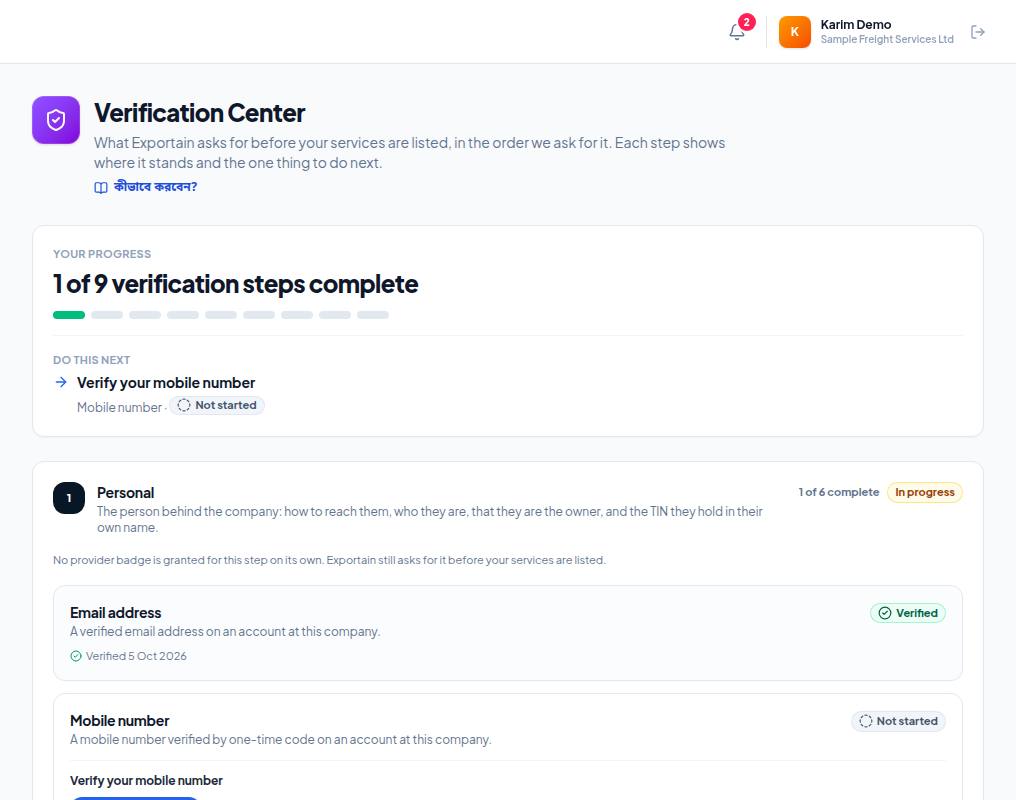
- 1. Your progress — how many steps of the total are done (for example 1 of 9 verification steps complete).
- 2. Do this next — the task that moves you forward most right now. Start here.
- 3. Level 1, Personal — your own contact and identity steps; the right side shows how many are done.
- 4. Each step's card — for example Email address, with its status (Verified or Not started).
Submitting your business registration
- Open the form in the Business registration card.
- Give the Legal business name (as on the trade licence), Trade licence number, Registered address and Trade licence expiry date. An expired licence is not accepted.
- Optional: Company TIN, Director's personal TIN, BIN / VAT registration, Incorporation number.
- Files: Trade licence (required); optional Company TIN certificate, Director's personal TIN certificate, Certificate of incorporation or MOA, BIN / VAT registration certificate. Each PDF, JPG, PNG or WEBP, up to 10 MB.
- Submit. If the reviewer needs something it shows under What the reviewer asked for.
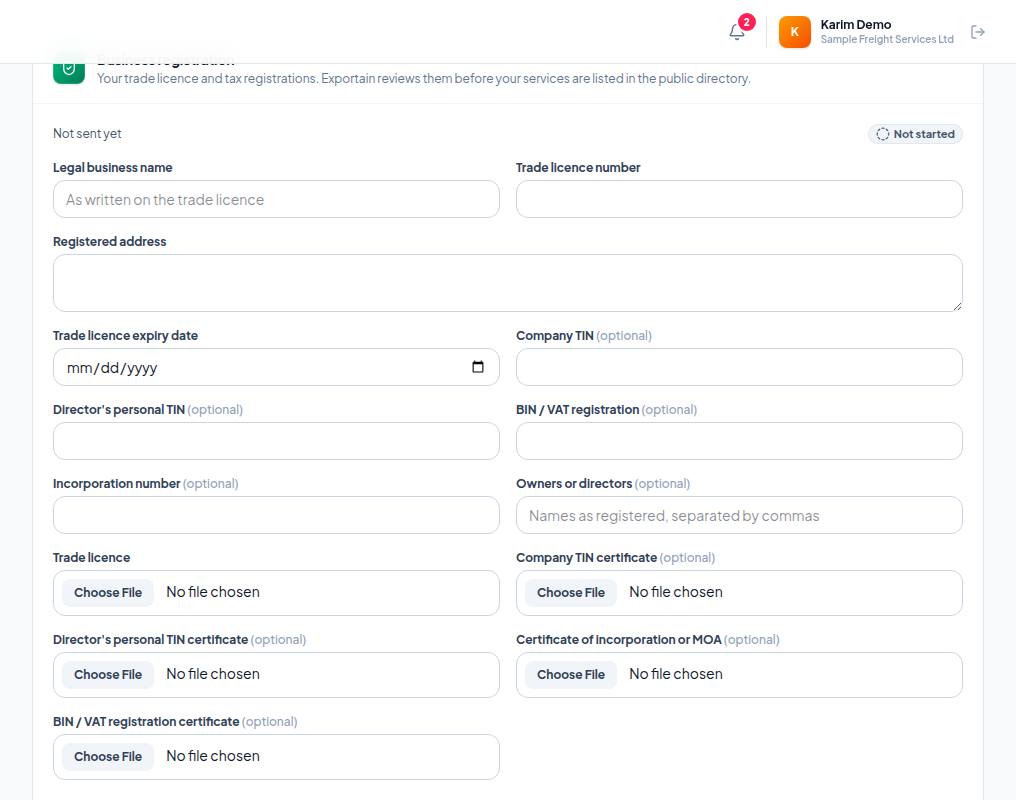
- 1. Legal business name — exactly as on your trade licence.
- 2. Trade licence number — the licence number; the expiry date (Trade licence expiry date) comes below.
- 3. Registered address — the address on the licence. TIN, BIN and the file uploads follow further down.
Licences, certifications and insurance documents
- In the Upload a credential document card, choose Which document is this?: Professional Certification / Trade License, Insurance Certificate or Customs Broker License.
- Add the file (PDF, JPG, PNG or WebP — up to 10 MB) and press Submit for review.
Mobile, WhatsApp and identity
- Mobile and WhatsApp numbers are verified in the Phone Verification card — Verify email, mobile and WhatsApp.
- The "Mobile number" step: choose SMS in the card and get a code on a Bangladeshi mobile number (+8801…) — at most 5 SMS codes a day. Numbers from other countries are verified on WhatsApp, which completes the "WhatsApp number" step.
- If the page says SMS verification is not available yet., no code was sent; try again later.
Provider badges
| Badge | How it is earned |
|---|---|
| Verified Provider | The company's business identity verification stands, someone in the company has the provider role, and a service listing is active |
| Licence Verified | The licence the service needs is verified and current, and an admin has confirmed the service needs it |
| Certification Verified | The service's professional certification is verified and current (with admin-confirmed conditions) |
| Insurance Verified | A liability insurance policy has been seen and has not expired |
| Facility Verified | Proof of the facility the service runs from has been seen (with admin-confirmed conditions) |
Frequently asked questions (FAQ)
Will Platinum give me more badges?
No. With the same evidence, a Free and a Platinum provider have the same badges.
Where do I submit my NID?
The provider portal has no page for it yet. Write to support@exportain.com.