

Services you offer and your profile
Adding the services you offer, where you work and what you handle, your licence number and the company's location.
Last checked: 1 October 2026
এই গাইডটি বাংলায় পড়ুনAdding a service
- Open Services you offer in the menu.
- Press Add a service in Your services.
- Choose the service under Which service? and add it.
- Once added, press Edit next to it to give the details (below).
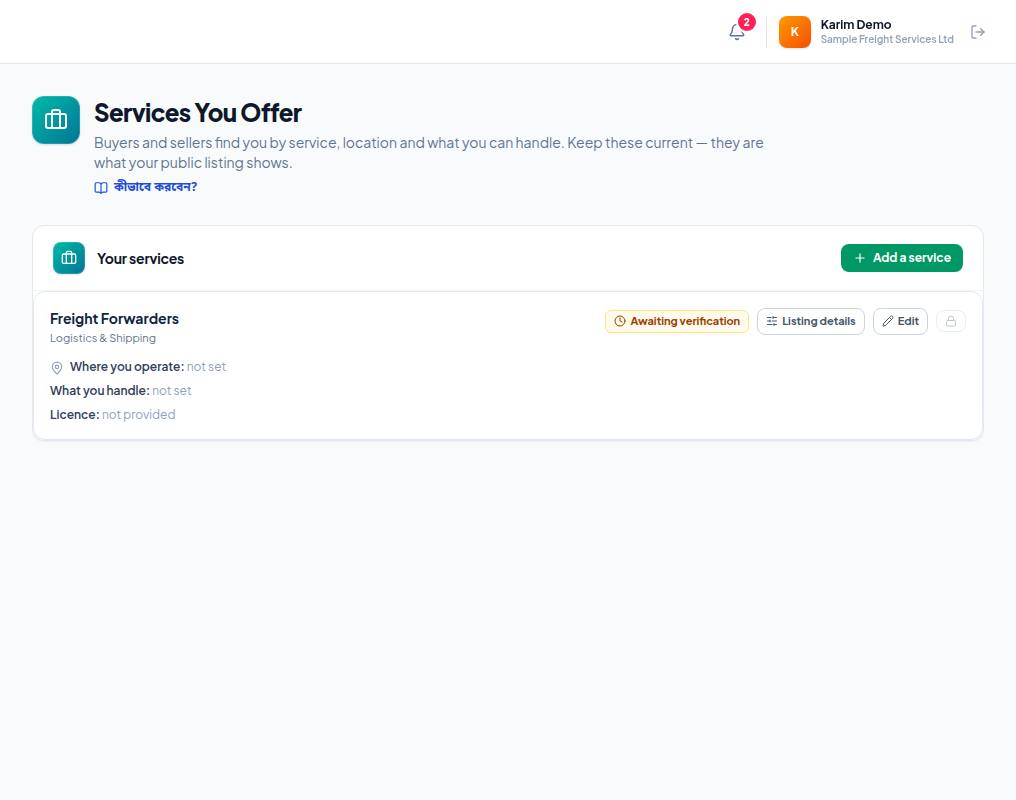
- 1. Add a service — add a new service.
- 2. Status — Awaiting verification means it won't show in the public directory until verification is done.
- 3. Listing details — the questions specific to this service (buyers search by them).
- 4. Edit — change where you work, what you handle and the licence number.
- 5. Where you operate, What you handle, Licence — what your public card shows; not set means not given yet.
Service details
- Where you operate — ports, cities or regions, separated by commas (for example Chattogram, Mongla, Dhaka).
- What you handle — shown on your public card (for example FCL, LCL, Air freight, Cold chain).
- Licence number — leave it empty if the service needs no licence. Exportain checks licences separately (Verification).
- Listing details — each service's own questions (for example a forwarder's transport modes, a warehouse's size); buyers search and compare on them.
Company location
Set where the company is under Settings → Company location. Owners and admins can change it.
Frequently asked questions (FAQ)
The remove button for a service doesn't work.
A service with leads or published freight rates cannot be removed.