

Order requests and buyer questions
Reading and answering the order requests buyers send from their cart, and the questions they ask about your products.
Last checked: 1 October 2026
এই গাইডটি বাংলায় পড়ুনWhat they are
- Order request — arrives when a buyer puts your product in their cart on exportain.com and presses Send order request. It carries the quantity, destination country, loading port, your listed price and the buyer's note. No money is taken — you agree the final price, shipping and payment terms with the buyer.
- Question — a buyer's question from a product page.
Reading and replying
- Open Order requests in the menu. The filters at the top: Order requests or Questions.
- Open a request from the Inbox; the details show on the right.
- Type your answer under Reply to the buyer — confirm the price and delivery date, or ask what you need to know.
- Choose a status: Mark as replied, Mark as negotiating or Close request.
- Press Send reply.
- To start a separate chat, press Open conversation with …; the conversation continues in Messages.
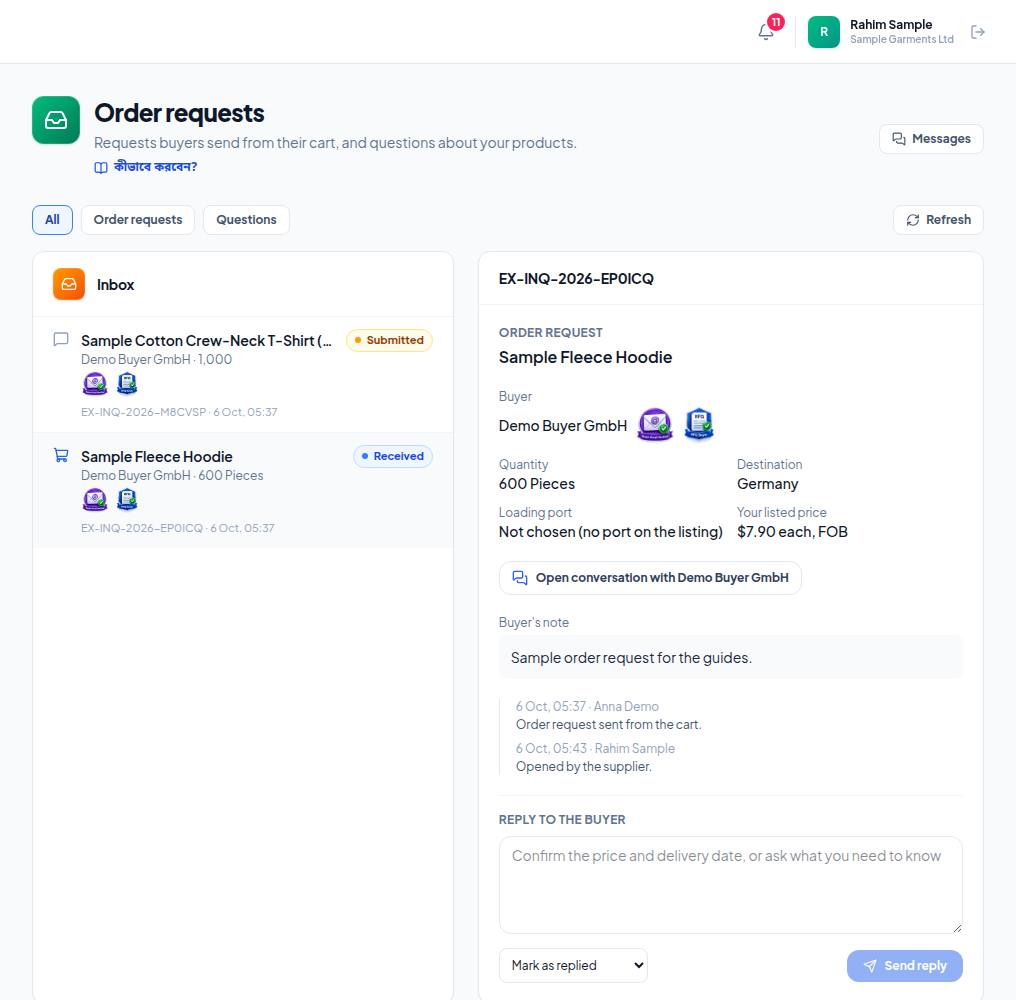
- 1. Filters — Order requests shows only cart order requests, Questions only questions.
- 2. Click a request — quantity, destination, loading port, your listed price and the buyer's note show on the right. A cart icon means an order request, a speech bubble a question.
- 3. Reply to the buyer — confirm the price and delivery date, or ask what you need to know.
- 4. Choose a status from the list below and press Send reply. The buyer reads it on their Requests page.
Frequently asked questions (FAQ)
Has the buyer paid with the request?
No. No payment is made with an order request.